Product guide
Dentaura documentation
Install the theme and Dentaura Core, import the demo, then brand your clinic site — booking, services, dentists, and marketing pages included.
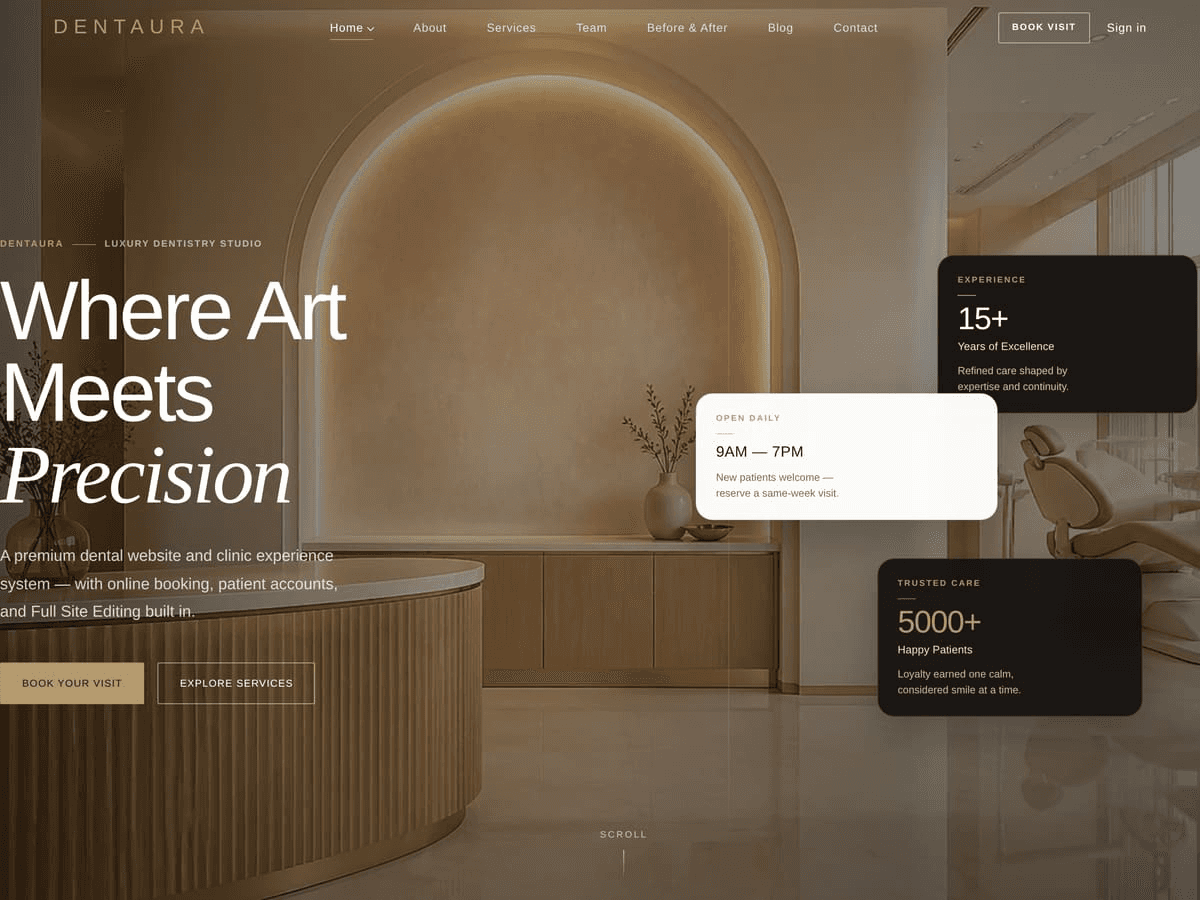
Theme Appearance preview · ships with the installable package
Quick start
Branded demo homepage in about 10 minutes.
- Install Dentaura Core Upload
dentaura-core-installable-plugin.zip→ Activate. - Install Dentaura theme Upload
dentaura-installable-theme.zip→ Activate. If upload fails (413), usedentaura-installable-theme-wpadmin.zipand place media via FTP. - Save permalinks Settings → Permalinks → Save.
- Import demo Dentaura → Import Demo. Soft media warnings are OK.
- Set homepage Settings → Reading → Homepage = Home.
- Brand it Logo and favicon under Pages → Marketing pages → Header; styles in Appearance → Editor.
System requirements
| Component | Minimum | Notes |
|---|---|---|
| WordPress | 6.4+ | Tested up to 7.1 |
| PHP | 8.0+ | 8.0–8.2+ typical |
| MySQL / MariaDB | 5.7+ / 10.3+ | — |
| PHP memory | 256M recommended | WP_MEMORY_LIMIT |
| Upload size | 64M+ | Full theme ZIP ~7 MB |
| HTTPS | Recommended | Login, booking, email |
Not required: Elementor, WPBakery, WooCommerce, Node, Composer, or Google Fonts CDN.
Installation
1 — Plugin
Plugins → Add New → Upload Plugin → dentaura-core-installable-plugin.zip → Install → Activate.
2 — Theme
Appearance → Themes → Add New → Upload → dentaura-installable-theme.zip → Install → Activate.
- If the host returns HTTP 413, upload
dentaura-installable-theme-wpadmin.zip, then place images fromdentaura-theme-media.zipinto the theme via FTP/SFTP. - Optional: install
dentaura-child-theme.zipafter the parent for safe custom CSS/PHP.
3 — Finish setup
- Permalinks Settings → Permalinks → Save Changes.
- Demo Dentaura → Import Demo.
- Reading Static front page = Home; posts page = Blog (if imported).
- Verify Front page loads;
/book-appointment/works; Dentaura admin menu appears.
Demo import
Open Dentaura → Import Demo and run Import. Creates pages, CPTs, menus, and sample clinic data.
What you get
- Home 1 / Home 2 / Home 3 demos
- Services, dentists, locations, cases
- Booking page & sample settings
- Header / Footer marketing pages
Tips
- Raise
max_execution_timeif import stalls - Optional image warnings can be ignored
- Re-import only on staging — it may duplicate content
Permalinks & homepage
After install (and after any import), visit Settings → Permalinks → Save so CPT and booking routes register.
Then Settings → Reading: set the front page to Home (or Home 2 / Home 3 for an alternate demo).
Feature inventory
Verified counts for Theme 1.6.41 / Plugin 1.15.72. Use this as the buyer-facing summary.
- Block patterns63
- Plugin Gutenberg blocks33
- Theme templates32
- Template parts11
- Style variations4
- Marketing page editors20
Included
- Online appointment requests with admin calendar
- Services, dentists, before/after cases, locations, clinic reviews
- Patient portal for booking-related access
- Header / footer / homepage section editors with live preview
- Email via SMTP or API (Brevo, Resend, SendGrid)
- Demo import and child theme ZIP
Not included
- Payments for appointments (requests only)
- Elementor / WPBakery / other page builders
- HIPAA or medical compliance certification
- WooCommerce (optional styling hooks only if you install it)
- Bundled licensed stock photography
Homepage
Edit Home 1 under Pages → Home Page (hero, services, testimonials, CTAs). Alternates: Home 2 (/home-2/), Home 3 (/home-3/).
Structural layout: Appearance → Editor. Day-to-day copy and media: page section editors and CPTs.
Site Editor (FSE)
Dentaura is a native block theme. Use Appearance → Editor for templates, template parts, patterns, and global styles. No Elementor or classic page builder is required.
Colors & style variations
Appearance → Editor → Styles. Pick a shipped variation or edit the palette / typography:
Ivory Clinical White Champagne Clinic Noir
Default stacks use system fonts (no Google Fonts CDN).
Dashboard & calendar
The Dentaura admin menu covers clinic operations: overview, calendar, appointments, patients, and settings. Use the calendar for day/week availability and booked slots.
Appointments
Incoming requests appear under Dentaura → Appointments. Confirm, reschedule, or cancel from admin; patients receive email when outbound mail is configured.
Settings
Configure clinic options under Dentaura → Settings (hours, notifications, email/SMTP or API providers, booking behavior).
Page section editors
Marketing pages expose structured section UIs (Home, About, Contact, Header, Footer, and more) so you can edit copy and media without hunting block markup. Prefer these for day-to-day content; use the Site Editor for layout architecture.
Services
Manage service CPTs from the Dentaura / Services screens. Set featured image, excerpt, and detail fields used by archive and single templates.
Dentists / team
Add dentists with photo, role, bio, and specialties. They appear on team templates and can be linked from booking.
Before & after
Showcase clinical cases on /before-after/ and related patterns. The old Gallery marketing page was retired — use Before & After plus gallery sections on Home 2–3 instead.
Reviews & testimonials
Clinic reviews and patient ratings feed homepage and marketing sections. Moderate new ratings under Comments → Clinic reviews when pending approval is enabled.
Locations
Find Us / location entries store address, map, hours, and contact details. Keep these in sync with footer and Contact page copy.
Blog
Standard WordPress posts with Dentaura templates. Set a Posts page under Settings → Reading after demo import.
Online booking
Public booking lives at /book-appointment/ (path may vary after import). Patients submit requests; staff manage them in admin. Configure confirmation emails under Settings → Email.
Blocks & patterns
Shipped patterns and custom blocks (namespace dentaura/*) power the demo. Insert patterns from the Site Editor inserter under the Dentaura category. See Feature inventory for counts.
Patient portal
Patients can log in to manage booking-related access when the portal is enabled. Ensure email delivery works for activation links.
WooCommerce
Optional styling hooks only — WooCommerce is not bundled and is not required.
Launch checklist
- Branding Logo, colors, favicon, clinic name
- Contact Phone, email, addresses on Contact + Find Us + footer
- Booking Test a live request on production HTTPS
- Email Production SMTP or API configured and tested
- SEO Titles, permalinks, sitemap (Yoast/Rank Math optional)
- Legal Privacy / terms pages linked from footer
- Backup Host backup or migration plugin before go-live
Email / SMTP
Configure Dentaura → Settings → Email (hosting SMTP or HTTPS API: Brevo, Resend, SendGrid). Local stacks often use Mailpit/MailHog; production needs a real delivery path.
Child theme
Install dentaura-child-theme.zip after the parent to preserve customizations across updates.
Translation & RTL
Text domains: dentaura and dentaura-core. Use POT/PO tools or Loco Translate. The product is translation-ready; WPML/Polylang are not bundled.
Performance
Use a caching plugin, optimize images, and keep PHP/memory healthy. System font stacks avoid external font CDN latency.
Troubleshooting
413 on theme upload
Use the slim wpadmin ZIP + dentaura-theme-media.zip via FTP, or raise host upload limits.
404 on booking / CPTs
Settings → Permalinks → Save. Confirm Dentaura Core is active.
Emails not sending
Configure SMTP/API under Dentaura → Settings → Email; check spam.
Demo looks incomplete
Confirm import finished; set Reading → Home; soft media warnings are often OK.
FAQ
Do I need Elementor?
No. Dentaura is a native FSE block theme.
Does booking include payments?
No — appointment requests only.
Is the product HIPAA certified?
No. You are responsible for local legal and compliance requirements.
Why is /gallery/ missing?
The Gallery marketing page was retired. Use Before & After and gallery sections on Home 2–3.
How do I update?
Back up, then upload newer installable ZIPs over the existing theme/plugin (or replace via FTP). Child theme customizations are preserved.
Support
Item support covers product bugs and documented setup questions via your Envato support channel. Custom development, third-party plugins, and server configuration are typically out of scope.
Changelog
Theme 1.6.41 / Plugin 1.15.72. Recent highlights:
- Brand favicon defaults and Header Clear image restore
- Domain-portable theme media URLs
- Before & After index contrast; Gallery marketing page retired
- Reliable media Publish/Update on page editors
See the notes above for this release. Product history also ships as CHANGELOG.txt next to the installable ZIPs.